
The IRS Didn't Send You This Email. Here's How to Spot the Scam Before It Costs You.
Jul 16, 2026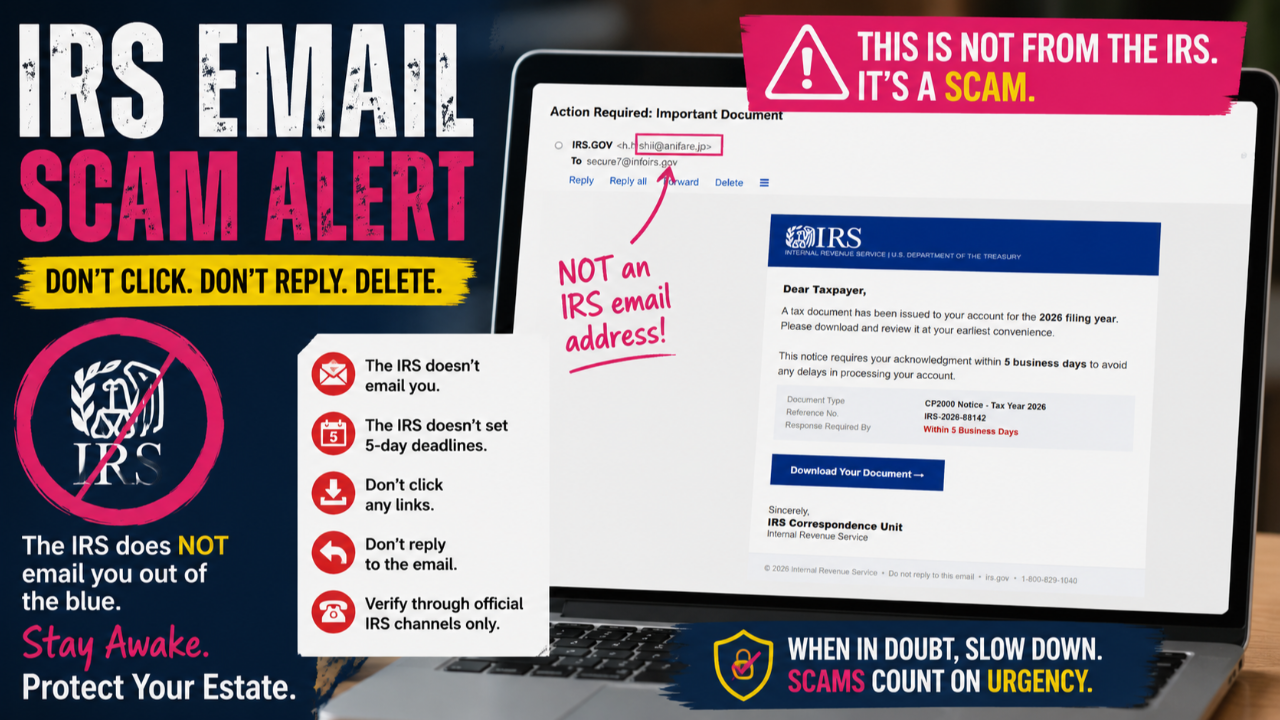
The IRS Didn't Send You This Email. Here's How to Spot the Scam Before It Costs You.
Subject: Action Required: Important Document
If this lands in your inbox, do not click it. Do not download anything. Do not respond.
At first glance, it looks convincing. It has an IRS logo. It references a CP2000 notice. It includes a deadline. It even has a phone number.
That's exactly how phishing scams work.
Let's walk through the red flags.
🚩 Red Flag #1: It's Not Even Sent From an IRS Email Address
The first thing you should always check is who actually sent the email.
In the screenshot, the sender appears as:
IRS.GOV
<[email protected]>
That is not an IRS email address.
The domain is anifare.jp, not irs.gov.
Anyone can make the display name say "IRS" or "IRS.GOV."
The actual email address is what matters.
🚩 Red Flag #2: The IRS Generally Doesn't Initiate Contact by Email
For most taxpayers, the IRS does not begin enforcement or examination by email.
The IRS almost always initiates contact through official U.S. Mail.
There are limited situations where the IRS may send emails—for example:
-
after you've created an IRS online account,
-
subscribed to IRS newsletters,
-
or are already engaged in an ongoing interaction you've initiated.
But the IRS does not suddenly email you saying an important tax notice is waiting and tell you to click a download button.
🚩 Red Flag #3: The Five-Day Deadline
The email claims:
"This notice requires your acknowledgment within 5 business days."
That should immediately raise suspicion.
IRS notices generally provide response periods measured in:
-
30 days
-
60 days
-
90 days
depending on the type of notice.
An arbitrary 5-business-day ultimatum is classic phishing psychology.
Scammers want you scared enough to click before you stop and think.
🚩 Red Flag #4: "Download Your Document"
The email urges you to click a large button to download a document.
That's one of the most common phishing tactics.
That button could:
-
steal your IRS credentials,
-
install malware,
-
harvest passwords,
-
or direct you to a fake IRS login page.
Never download unexpected tax documents from an unsolicited email.
🚩 Red Flag #5: "IRS Correspondence Unit"
The signature simply says:
IRS Correspondence Unit
While the IRS does have correspondence functions internally, this generic sign-off provides no identifying office, address, employee, or contact information that would allow you to verify who supposedly sent it.
Official IRS correspondence is typically much more specific.
🚩 Red Flag #6: "Do Not Reply"
The email says:
"Do not reply to this email."
Think about that.
If the IRS supposedly needs your acknowledgement within five business days...
...why is there no way to acknowledge it?
No reply.
No named employee.
No mailing address.
Just a button.
That's exactly what a phishing campaign wants.
🚩 Red Flag #7: Generic Greeting
It begins:
Dear Taxpayer,
The IRS already knows who you are.
Official notices almost always identify the taxpayer by name and include identifying information consistent with official mailed correspondence.
Generic greetings are another hallmark of mass phishing emails.
🚩 Red Flag #8: The Phone Number Doesn't Make It Legitimate
The email lists:
1-800-829-1040
Interestingly, that is the IRS's main individual taxpayer assistance number.
Scammers frequently include legitimate government phone numbers to make fraudulent emails appear authentic.
A real phone number does not make the email legitimate.
What Should You Do Instead?
If you receive an email like this:
✅ Don't click any links.
✅ Don't download attachments.
✅ Don't reply.
✅ Delete the email.
If you're concerned there really may be an issue with your tax account:
-
Check your IRS Online Account by navigating to the IRS website yourself (don't use links from the email).
-
Review any notices you've received through the mail.
-
If necessary, call the IRS using a phone number you obtain independently from the official IRS website or prior legitimate correspondence.
When in Doubt, Slow Down
Phishing depends on one thing:
Urgency.
"Five days."
"Immediate action."
"Download now."
"Your account."
Those phrases are designed to override critical thinking.
The real IRS generally gives taxpayers time to respond, communicates primarily through official mail, and doesn't ask you to verify your identity by clicking unexpected email links.
When you receive an email that tries to rush you into action, treat urgency itself as a warning sign.
Because sometimes the fastest way to protect yourself... is to do absolutely nothing.
Need Help Responding to an IRS Notice?
Not every IRS notice is a scam—but not every notice should be accepted at face value either.
Before you admit liability, send payment, or respond, it can be worth having someone review exactly what the IRS is claiming, what authority they're relying on, and what your response options may be.
At Conscious Contracting, our Stewards help members understand administrative correspondence, review IRS notices, and think through appropriate next steps based on their individual circumstances.
If you'd like a Conscious Contracting Steward to review your IRS notice with you, you can schedule a consultation here:
👉 https://www.consciouscontracting.life/site/services
Knowledge is your first line of defense. Don't let fear or artificial deadlines make decisions for you.
